
Download Hack-It – Free Window Manipulation Tool for Windows, Mac & Android
Hack-It is a lightweight, free software tool designed to simplify window management on your computer. Whether you're a professional, student, or casual user, Hack-It helps you instantly identify and close any open window with a single click. Say goodbye to cluttered desktops, persistent popups, and slow performance caused by too many running applications.
This powerful yet simple tool gives you full control over your open windows, making it easier than ever to maintain a clean, efficient workspace. With a minimal footprint and no complicated setup, Hack-It runs smoothly on Windows, Mac, and even Android devices. It’s ideal for users who want a quick, secure way to manage their desktop environment without relying on Task Manager or keyboard shortcuts like Alt+Tab.
The intuitive interface allows even novice users to navigate and close unwanted windows with confidence, while advanced users appreciate its speed and reliability. Hack-It is regularly updated to ensure compatibility and security, making it a trusted choice for everyday productivity. Download Hack-It today and take full control of your digital workspace.
Key Features of Hack-It
One of the standout reasons why Hack-It has gained popularity among users is its powerful yet simple feature set. The software is designed with a singular focus: to give users instant visibility and control over all open windows. The first and most essential feature is the real-time window overlay.
When activated, Hack-It displays a transparent grid that highlights every open window on your screen. Each window is labeled with its title and process name, making it easy to identify even the most obscure or hidden popups. This is especially useful when dealing with malicious or unwanted popups that appear after visiting certain websites.
Another powerful feature is the one-click close function. Simply click on any highlighted window, and it closes instantly—no need to navigate through Task Manager or use complex keyboard shortcuts. This is a game-changer for users who frequently juggle multiple applications and need to clear their workspace quickly. Hack-It also includes a process identification tool that shows the underlying process behind each window, helping advanced users determine whether a window is safe to close or a system-critical application.
For those concerned about security, Hack-It includes a safe mode toggle that prevents accidental closure of system windows like Explorer or Control Panel. This safeguard ensures that even novice users won’t disrupt their operating system. The software also supports custom hotkeys, allowing you to activate the window overlay with a keyboard shortcut of your choice. Additionally, Hack-It is lightweight and portable, meaning it doesn’t consume much RAM or CPU, and it can be run directly from a USB drive without installation. These features make it a versatile tool for both home and office environments.
How to Install and Use Hack-It
Installing and using Hack-It is incredibly straightforward, making it accessible even for users with minimal technical experience. The software is available as a free download for Windows, Mac, and Android devices. To get started, visit the official website and download the appropriate version for your operating system. The installation process is quick and requires no complex configurations—simply run the installer and follow the on-screen prompts. For users who prefer a portable version, Hack-It also offers a standalone executable that can be run directly from a USB drive, perfect for use on shared or public computers.
Once installed, launch Hack-It from your desktop or applications folder. The software runs in the background and remains minimised to the system tray. To activate the window overlay, press your assigned hotkey (default is Ctrl+Shift+H) or click the icon in the system tray.
Instantly, a semi-transparent grid appears, highlighting every open window with its title and process name. Hovering over a window displays additional details, such as the window class and memory usage. To close a window, simply click on it.
A confirmation dialog appears to prevent accidental closures, especially for system-critical windows.
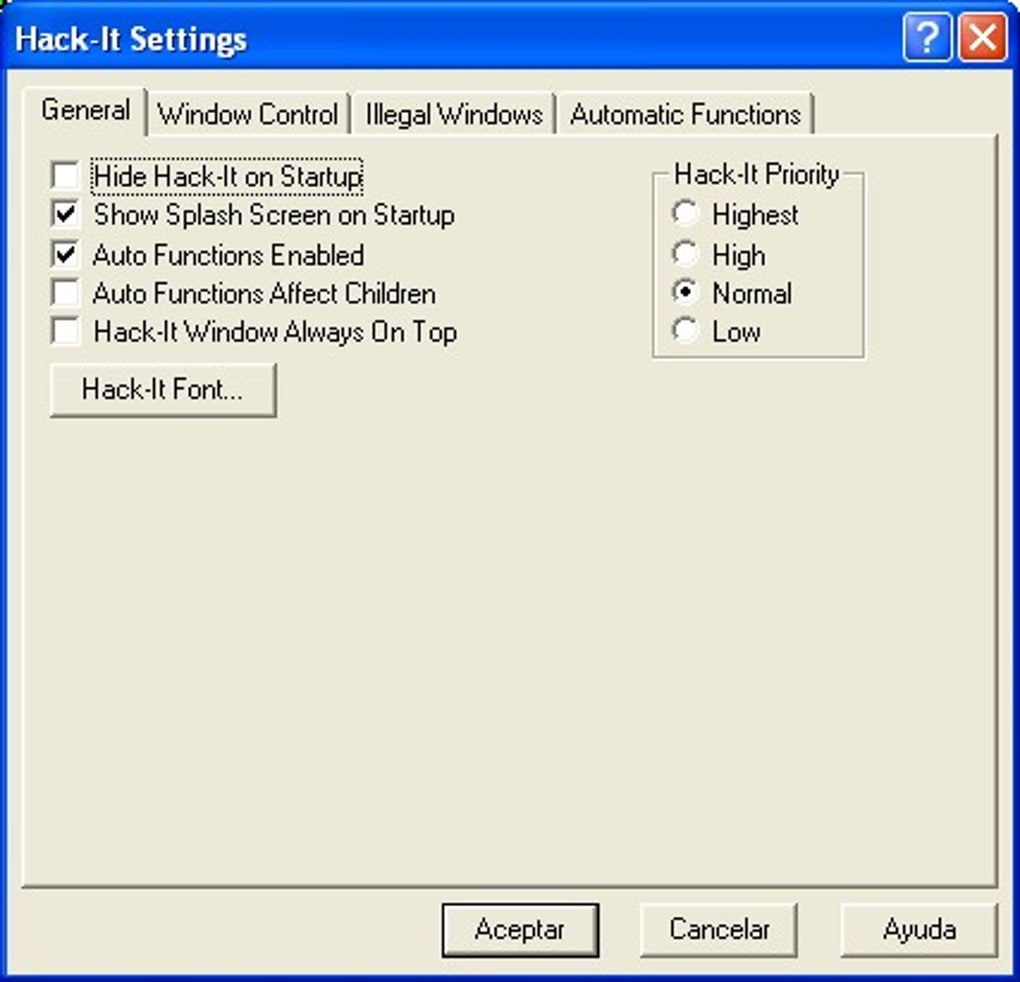
For advanced users, Hack-It offers a settings menu where you can customise the overlay appearance, hotkey combinations, and safety settings. You can also enable logging to track which windows were closed and when. The software updates automatically in the background, ensuring you always have the latest security patches and performance improvements. Regular updates also enhance compatibility with new versions of Windows, macOS, and Android. Whether you're managing a busy workday or cleaning up after a browsing session, Hack-It makes window management fast, intuitive, and secure.
Compatibility & System Requirements
One of the major strengths of Hack-It is its broad compatibility across multiple platforms. The software is officially supported on Windows 7 and later, including Windows 10, Windows 11, and Windows Server editions. It runs natively on both 32-bit and 64-bit systems, ensuring smooth performance regardless of your hardware setup. For Mac users, Hack-It is compatible with macOS 10.14 (Mojave) and newer, including Apple Silicon (M1/M2) Macs. The Mac version is built with native Apple frameworks, providing seamless integration with the operating system.
For mobile users, Hack-It offers an Android companion app that allows you to manage windows remotely from your smartphone or tablet. This is particularly useful for users who work across multiple devices or need to close unwanted windows while away from their desktop. The Android app connects via local network or Bluetooth, providing real-time control over your computer’s open windows. While there is no iOS version at this time, the developers have confirmed that it is under development and expected to launch in the next major update.
System requirements are minimal, making Hack-It suitable for older or low-end machines. It requires at least 512 MB of RAM, 100 MB of free disk space, and a processor capable of running the target operating system. The software does not require administrator privileges to run, although some features may be limited without elevated permissions. Hack-It is also fully compatible with third-party tools like virtual desktops, window managers, and screen-sharing software. This makes it a reliable choice for professionals using complex multi-monitor setups or remote work environments.
Pros and Cons of Hack-It
- Pros:
- Completely free to download and use
- Lightweight with minimal system resource usage
- Real-time window overlay with clear identification
- One-click window closing with safety confirmation
- Supports custom hotkeys and portable mode
- Regular automatic updates for security and performance
- Safe mode prevents accidental closure of system windows
- Available for Windows, Mac, and Android
- Cons:
- No official iOS version (in development)
- Limited to window management—no process monitoring
- May not detect deeply hidden or minimized windows in some cases
- Interface is minimal—lacks advanced customization options
- Occasional lag on older systems with many open windows
FAQ: Frequently Asked Questions
Is Hack-It safe to use?
Yes, Hack-It is a secure and trusted tool. It does not collect user data, install malware, or modify system files. The software is open-source, and its code is available for public review. Regular updates ensure that any potential vulnerabilities are patched quickly.
Can I use Hack-It on my Mac or Android device?
Yes, Hack-It is available for macOS 10.14 and above, as well as Android 8.0 and newer. The Android app allows remote window management via your mobile device.
Does Hack-It require admin rights to run?
No, Hack-It can run without administrator privileges. However, some advanced features may require elevated permissions for full functionality.
How often does Hack-It update?
Automatically—Hack-It checks for updates in the background and applies them silently. Major updates are released every 4-6 weeks with new features and security fixes.
Can Hack-It close system windows like Task Manager?
Not by default. Hack-It includes a safe mode that blocks the closure of critical system windows. You can disable this feature in settings, but it’s not recommended for most users.
Conclusion: Take Control of Your Desktop Today
If you're tired of cluttered screens, persistent popups, and slow performance caused by too many open windows, Hack-It is the perfect solution. This free, lightweight, and secure tool gives you instant visibility and control over every window on your computer. Whether you're a professional managing multiple projects, a student juggling research tabs, or a casual user cleaning up after browsing, Hack-It streamlines your workflow and boosts productivity. With its intuitive interface, real-time overlay, and one-click closing, it’s faster and easier than using Task Manager or keyboard shortcuts.
Download Hack-It today and experience the power of effortless window management. It’s completely free, regularly updated, and compatible with Windows, Mac, and Android. Don’t let unwanted windows slow you down—take back control of your desktop with Hack-It.
Download Hack-It now and simplify your digital life.







